Facilities management software you can start using today.

MyFmHub keeps your sites, assets, planned maintenance, compliance and repairs in one place. It's built for in-house facilities teams and for anyone responsible for their company's buildings. There's no setup project and no training course.

Free for one person, for as long as you like. No card needed.

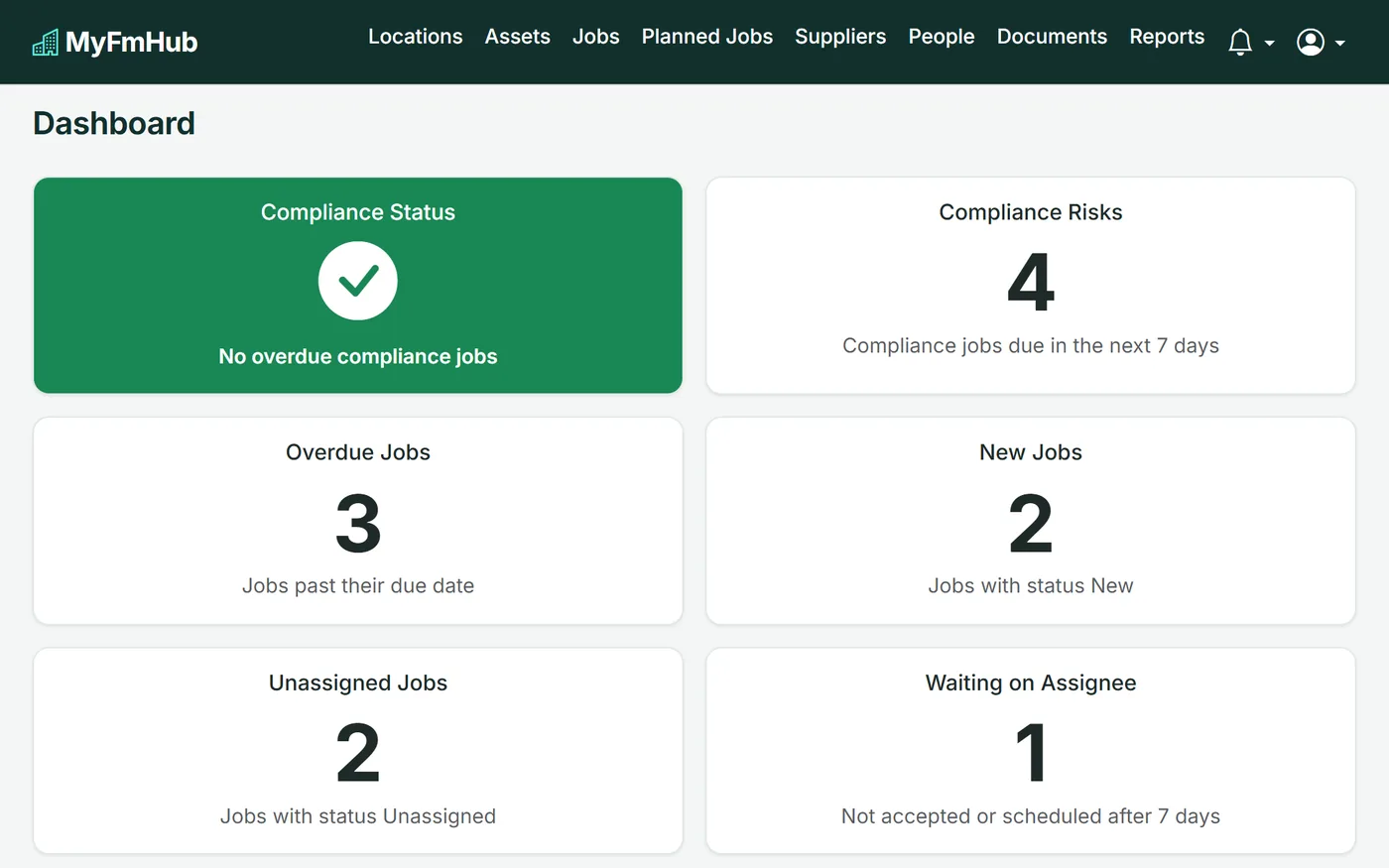
The MyFmHub dashboard: compliance status green with no overdue compliance jobs, 4 compliance risks due in the next 7 days, 3 overdue jobs, 2 new jobs, 2 unassigned jobs, 1 job waiting on its assignee and 2 completed jobs to review.

Why MyFmHub

Facilities management without the setup project

Most CAFM systems are bought for large FM providers and take months to set up. MyFmHub is made for teams who need to get on with looking after their buildings.

Start today, not after a setup project

There are no consultants, workshops or data mapping before anyone can raise a job. Register, add your sites and raise your first job the same afternoon. Common job, asset and document categories are already filled in, and Excel templates bring in your sites, assets and suppliers in bulk.
Free to try, easy to leave

Solo is free for one person for as long as you like, as easy to start as a spreadsheet but made for buildings. When more of your team needs it, upgrade month by month. If it isn't for you, export all your records to Excel, and your documents and photos as a download, whenever you want.

Made for the people who look after the building

It's for in-house facilities teams, and for the office, operations and site managers who've been handed responsibility for their company's buildings. It uses plain words with no jargon, so there's nothing to learn before you start. Store and branch managers can be limited to their own sites.

The admin takes care of itself

Facilities teams are always stretched. MyFmHub raises planned jobs before they're due and can assign them straight to the right contractor. It also chases suppliers who haven't responded and keeps whoever reported a problem updated. Your dashboard shows only what needs you: overdue work, compliance risks and expiring certificates.

Inside MyFmHub

See what your team and your contractors will use

These are real MyFmHub screens, filled with example data for a retailer with a head office, two stores and a distribution centre.

Everything about a job on one page

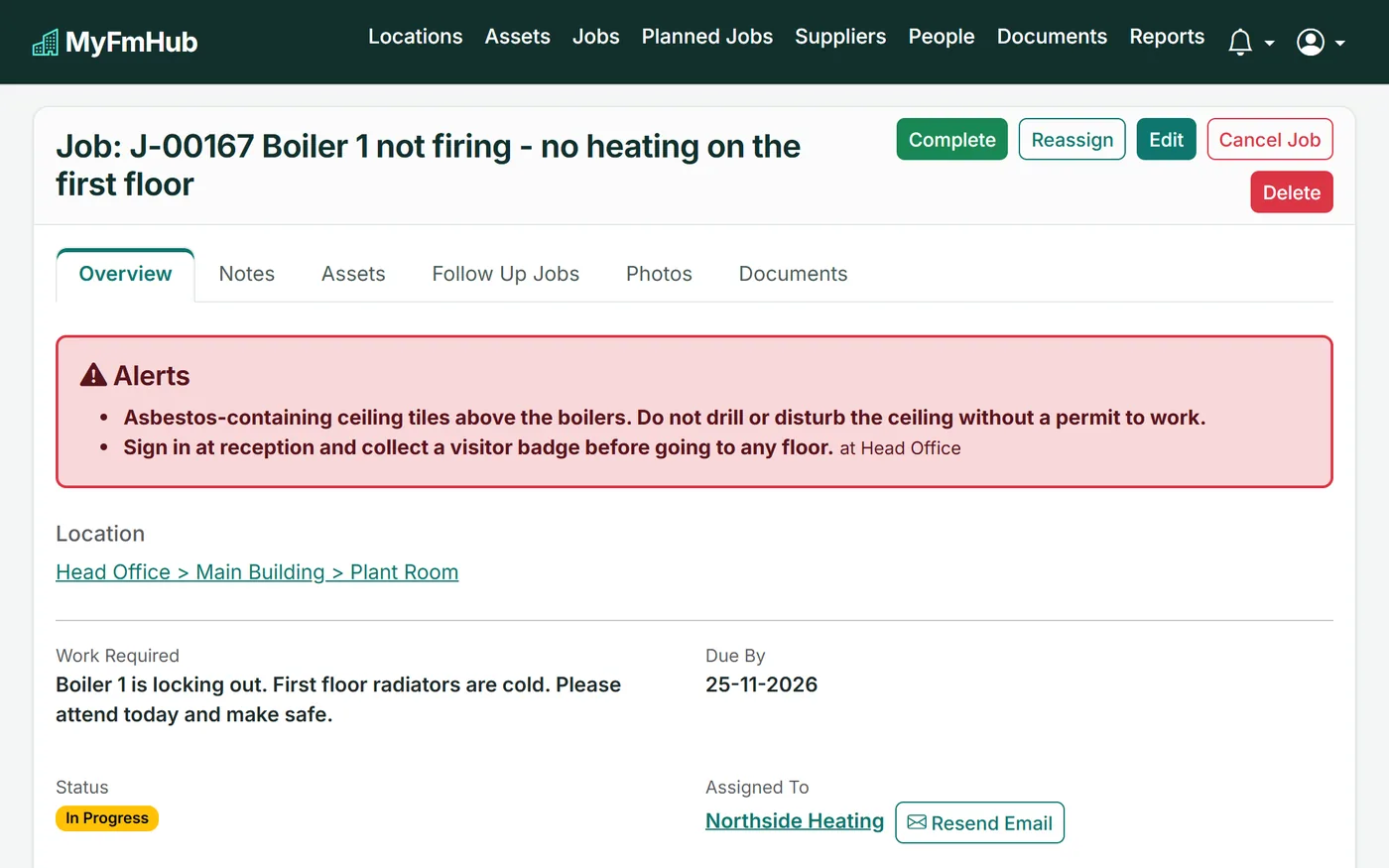
Where the job is, who's doing it, where it's up to and when it's due. Warnings for the location, such as asbestos or access arrangements, appear at the top of every job there and in the contractor's email.

Notes, photos and documents stay with the job, so there's a full history when someone asks what happened.

A MyFmHub job page for J-00167, boiler 1 not firing, at Head Office, Main Building, Plant Room. A red box at the top warns of asbestos-containing ceiling tiles and asks visitors to sign in at reception. The job is In Progress and assigned to Northside Heating.

Know what's due, and what it will cost

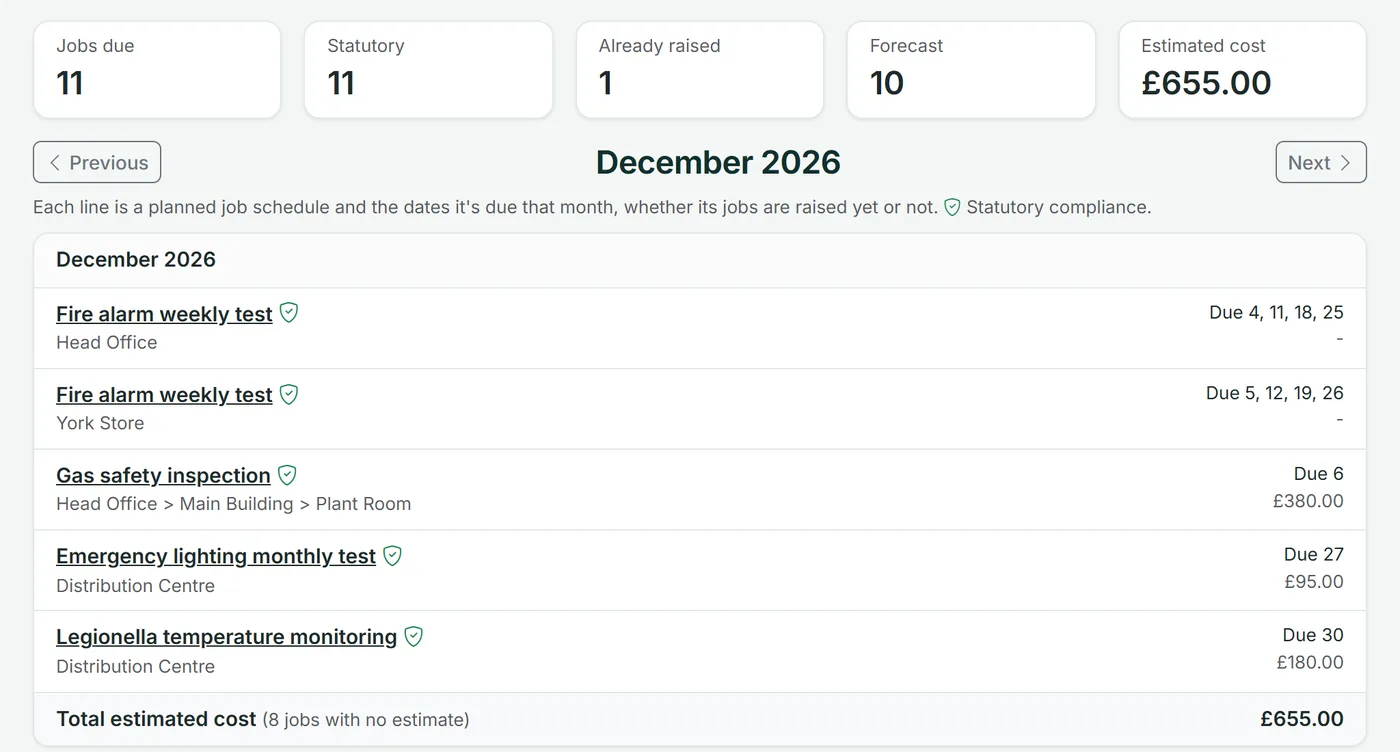
The planned work calendar shows every inspection and service due each month across all your sites, with statutory work marked and the estimated cost added up.

Download it as a PDF for budget meetings, or filter it to one site or category.

The planned work calendar for December 2026: 11 jobs due, all statutory, with an estimated cost of 655 pounds. It lists weekly fire alarm tests at Head Office and York Store, a gas safety inspection, an emergency lighting test and legionella monitoring.

Your estate, laid out as it really is

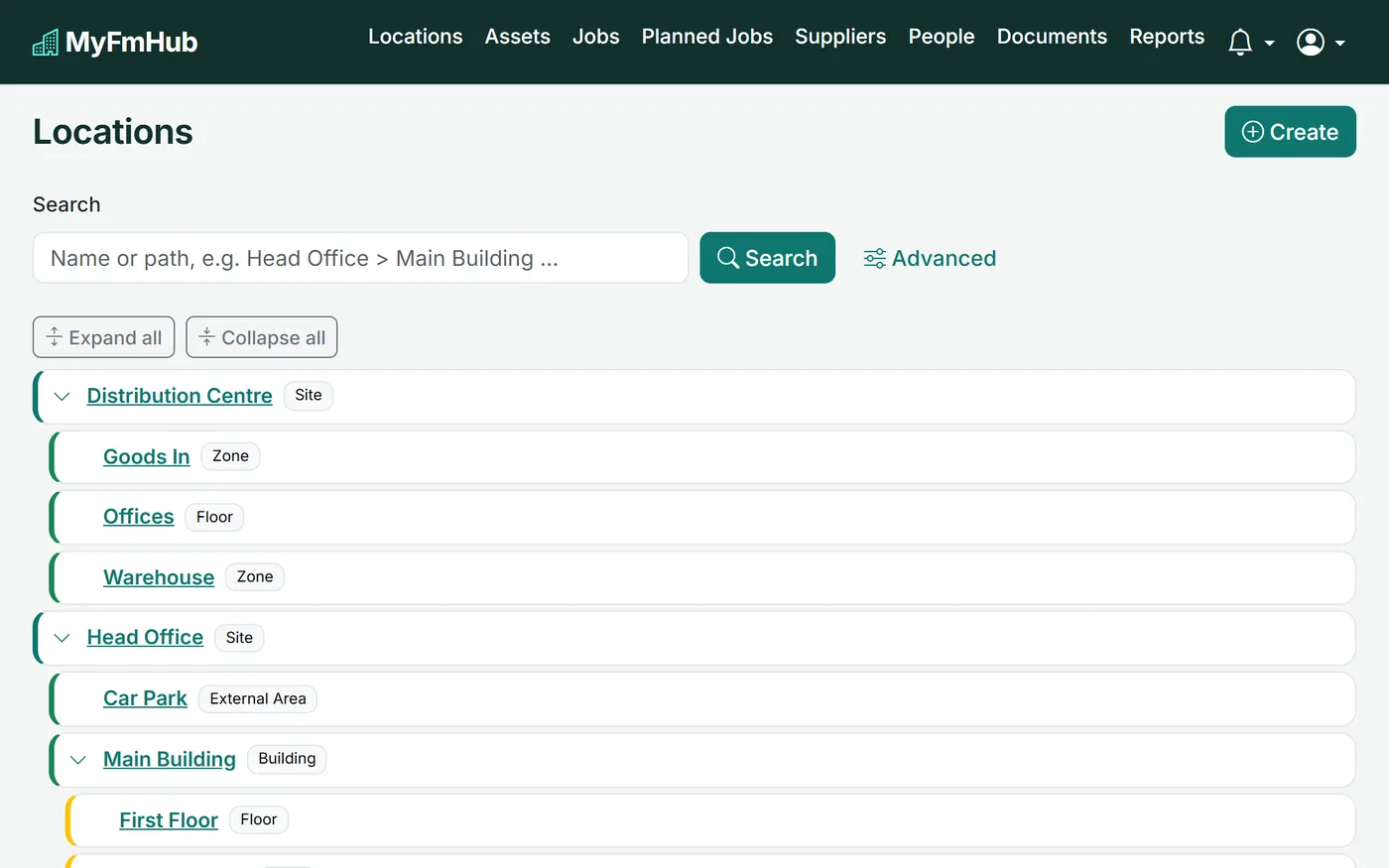
Set up sites, buildings, floors and rooms in the shape of your estate, up to five levels deep. Every list and report can be filtered to one location and everything inside it.

Store and branch managers can be limited to their own sites.

The MyFmHub locations tree: Distribution Centre, Head Office with its car park and main building floors, Leeds Store with its sales floor, staff room and stockroom, and York Store.

Contractors complete jobs from their phone

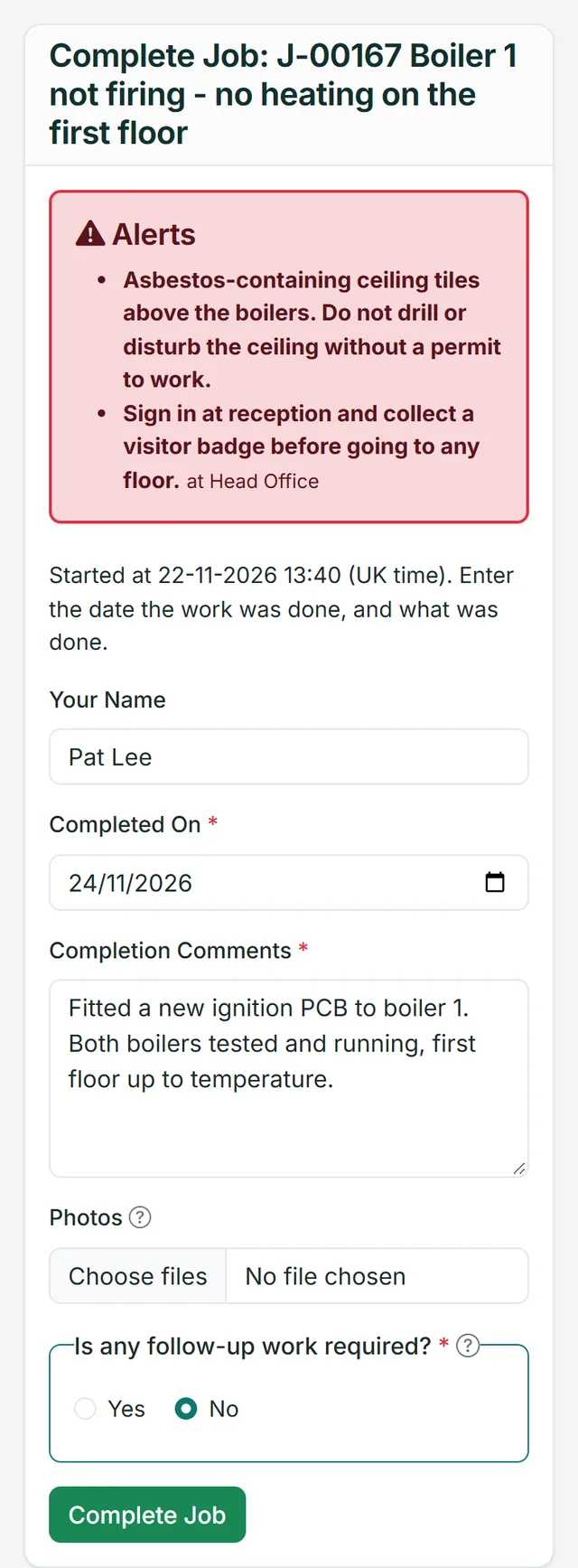
Suppliers don't need a login. Each job email has its own links to accept, book, start and complete the work. They see the same site warnings, record what they did and add photos.

It appears on the job straight away, ready for you to review and close.

A supplier completing job J-00167 on their phone from the emailed link, with the site alerts at the top, their name, the completed date, their comments about fitting a new ignition PCB, and No to follow-up work.

Features

Everything you need to run your buildings, and nothing you don't

Every plan includes every feature. The only difference between plans is how many people can sign in.

Sites and locations

Sites, buildings, floors and rooms, nested up to five levels deep. Add an alert to a location, such as asbestos in the ceiling void, and it appears on every job there.

Assets

Record each asset's number, serial number, condition, and warranty and replacement dates. Break large equipment into sub-assets, and keep photos and documents with each one.

Planned maintenance and compliance

Schedule servicing and inspections from every day to every five years. Jobs are raised before they're due, statutory work is flagged, and the compliance report shows what was done on time.

Jobs

Manage all planned and reactive jobs in one place. Approve them, assign them to your own staff or a supplier, and follow them until they're completed and closed. Every step is recorded in the job's notes.

Documents and photos

Keep certificates and reports with the locations, assets and jobs they belong to. Documents due to expire within 30 days are flagged on the dashboard.

Suppliers

Contractors don't need an account. They get the job by email, with links to accept, schedule, start and complete it, and an automatic reminder if a step is left waiting.

Reports

See jobs raised and completed each month, statutory compliance, jobs that have been waiting too long, and a calendar of planned work with estimated costs. Download any report as a PDF.

People and permissions

Use groups to decide what each person can see and do. Store and branch managers can be limited to their own locations.

Import and export

Bring in your locations, assets, suppliers and schedules from Excel templates, and undo an import if it isn't right. Export everything to Excel whenever you want.

Plans

Priced per organisation, not per person

Start on Solo for free, and move up when more of your team needs to sign in. Suppliers working on your jobs never count towards your logins.

Solo

Free

  • 1 person can sign in
  • 2 GB for documents and photos
  • Every feature
Start free

Unlimited

£250 a month + VAT

  • As many people as you need can sign in
  • 250 GB for documents and photos
  • Every feature
Start free, upgrade any time

Pay monthly, or yearly for a 10% discount. We invoice you, so there's no card to enter, and you can upgrade at any time from inside MyFmHub.

Contact us

Questions? Get in touch

Want to talk about your sites before you start, or about the Unlimited plan for a larger team? Send us a message and we'll reply by email.

Already a customer? Raise a support ticket from inside MyFmHub, or email [email protected].

We use what you send only to reply to you. See our privacy policy.

Set up your first site in a few minutes

Register, add a location and raise your first job. It's free for one person, for as long as you like.